
-
Herzlich Willkommen bei den Konsolen-Senioren!
Wir sind eine deutschsprachige Community, die Spielern über 30 Jahren seit 2007 ein Zuhause im Internet bietet, in dem sie sich mit gleichgesinnten und erwachsenen Spielern über ihr Hobby austauschen und zu gemeinsamen Aktivitäten verabreden können.
Entstanden aus den Xbox-Senioren (früher: XBL-Senioren) und den PSN-Senioren bieten wir mittlerweile eine konsolenübergreifende Diskussions- und Verabredungsplattform, bei der das respektvolle Miteinander und der Spaß am Hobby im Vordergrund stehen.
Neben konsolenspezifischen Unterforen und Multiplattform-Spielethreads bieten wir auch eine Retro-Ecke und einen Bereich, in dem sich für die immer größer werdende Anzahl Spielen, die Cross-Plattform-Play unterstützen, verabredet werden kann.
Egal, ob Du einfach nur über Spiele diskutieren möchtest, Dich mit anderen Spielern verabredet willst oder einfach nur Deine Spielerfahrungen mit anderen teilen möchtest, bist Du bei uns herzlich willkommen.
Natürlich kannst Du auch einfach weiter passiv bei uns mitlesen, aber warum schnappst Du Dir nicht einfach Deine Tastatur, registrierst Dich bei uns und gestaltest die Community durch Deine Teilnahme aktiv mit?
Wir freuen uns auf Dich!
Du solltest ein Upgrade durchführen oder ein alternativer Browser verwenden.
Xbox One Sytemupdates Previewprogramm
- Themenstarter L1NCHP1N
- Beginndatum


L1NCHP1N
Rentenbezieher
Bei mir führte das Update allerdings dazu, dass nur noch Video aber kein Audio mehr aufgezeichnet wurden.
Nach einem kompletten Neustart der Konsole (Hauptschalter 10 Sekunden gedrückt halten, danach Konsole für mind. 30 Sekunden vom
Strom abklemmen) hat sich das aber wieder berappelt.
Aufnahmen sind jetzt wieder mit Bild und Ton, wie es sein soll.

L1NCHP1N
Rentenbezieher
Gibts schon Infos, speziell für Mai, was für neue Features kommen sollen?
Nein, bisher noch keine Info. Nicht mal ein Termin.
Nach Ende des 1404-Updates wurde lediglich gesagt, dass es weitere geben wird, als "Datum" wurde nur "bald" angegeben. :zwinker:
Die Anzahl der Vorschläge und Wünsche im Forum war aber relativ umfangreich.
Ein Thema, an dem man mit Hochdruck arbeite, solle z.B. der Anschluss von externen Festplatten sein.
Ob das aber schon mit dem nächsten Update kommt, ist unklar.
Ich hab immer ein Auge auf das Forum und sobald es was neues gibt, wird es auch hier zu lesen sein! :keine Panik:

Gibts schon Infos, speziell für Mai, was für neue Features kommen sollen?
As part of our ongoing effort to bring new features to our Xbox fans worldwide, we’ll begin rolling out more features to folks in our early access program beginning this week and we’re looking forward to their feedback before shipping the system update to all Xbox One owners in May. We hope you’ve been enjoying our most recent Xbox One system update that rolled out last week and we look forward to bringing you even more great features in the months ahead.
Feature highlights for this next phase of our early access program include a new sound mixer for snapped apps, chat volume controls when using Kinect and the option to help us improve speech recognition. You can also take this update on demand as soon as it becomes available if you’d like.
Sound Mixer for Apps with Snap and Volume Controls When Using Kinect with Chat
We’ve received great feedback from fans asking for more control over audio levels and background sound. As a result, under Settings we’ve added two new features for controlling your audio options. With the new Sound mixer, you’ll be able to control the volume levels of two apps when you’re using Snap letting you decide which app is louder. In this same section, you’ll also be able to control the volume levels when you’re using Kinect for chat.
Opt-In to Help Improve Speech Recognition
Being able to control your Xbox One with voice commands can be a magical moment and we want to continue making this great for all Xbox One owners worldwide. The more voice samples we have to input into our algorithms, the better and more responsive Xbox One can be to our fans. If you want to help us in our efforts to make voice and speech improvements for Kinect even better, you can opt-in to a speech data collection. Under Settings, then Privacy & Online Safety, go to Customizing privacy and online safety and set Share Voice Data to Allow. This is completely optional and all voice data shared via this setting will be used for product improvement only.
Take the Next System Update When You Want
You’ll now also be able to take this next system update as soon as it’s available if you want. When this update is made available, you’ll find the option under Settings, then select System update as shown below.
As always, we’re thrilled with our fans’ enthusiasm about our Xbox One system updates and we’re really excited about what’s coming in the next few months. We look forward to hearing your feedback about these latest features in our early access program and will roll them out to everyone worldwide in May.
Xbox Live's Major Nelson » Coming Soon: New Audio Controls and Opt-In Setting to Help Improve Voice Recognition :
L1NCHP1N
Rentenbezieher
Sprachbefehl diesen "Palim Palim"-Sound von sich gibt, den man sonst nur bei manuellem Einschalten zu hören bekommt...
Woran liegt es?!
Daran:
We have started to deploy the latest update for you to preview: 1405 (xb_rel_1405.140429-2200). Consoles that are in standby mode will be able to install the update starting at 4:00PM PDT on May 2nd. If you want it right away, feel free to use the new System Updates button! Simply check Settings>System, and if you see System update, click it to start your update. Consoles that have not received the update in standby mode or via the manual update button by 1:00AM PDT on May 4th will be prompted to install the update when they connect to Xbox Live.
Let’s take a look at some of the changes and fixes you’ll be seeing in the coming update!
Improvements and Fixes
- Updates to help address issues where Game DVR clips may be recorded without audio.
- Underlying OS changes required to enable planned 1405 features.
- Snap and Kinect Audio Controls. We know you loved the brief view of the UI for this feature in the last wave, but it wasn’t quite ready. It’s now ready for everyone to give it a go! Adjust the volume differences between apps when you have one open in Snap, or adjust how much softer the audio is made when using Kinect for communication.
- Opt-In to help us improve Speech Recognition. We’re always looking to make Kinect Voice Recognition more accurate, and the more voices we have to fine tune our algorithms, the better it can be! As such, we’ve added an option under Settings>Privacy & Online Safety>Customizing privacy and online safety titled Share Voice Data. Setting this to “Allow” will allow us to use your voice data to make Kinect Voice Recognition better.
- Test the System Update button!Now that the System Update button is available, we hope you’ll put it to use as new updates become available in this Wave! Try it out, and let us know of any issues you run into.
Abgesehen vom Einschaltsound ist mir noch eine weitere Änderung aufgefallen:
Im System-Menü findet sich dieser freche Button:
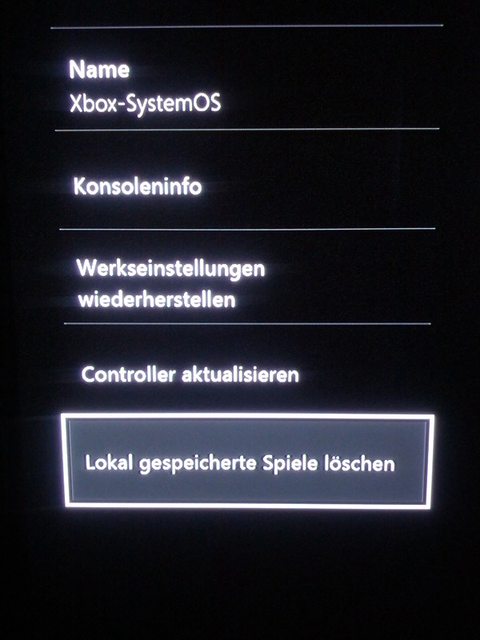
Der ist mit Vorsicht zu geniessen. Denn:
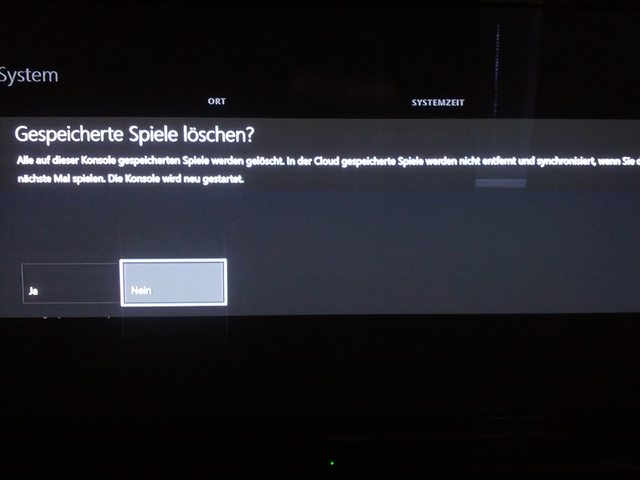
Einmal bestätigt, werden alle Spiele von der Festplatte gelöscht.
Das ist erstmal nicht soo schlimm, da die Daten in der Cloud ja gespeichert bleiben, aber da wir ja wissen, wie lange Installationen dauern können...
Wer das Update noch nicht im Standby bekommen hat, kann es evtl. manuell herunterladen. Der dazu notwendige Button befindet sich ebenfalls
unter Einstellungen -> System.
L1NCHP1N
Rentenbezieher
Ich hab das jedenfalls heute erst entdeckt.

Im Zuge des Preview-Programms gibt es übrigens auch eine Beta für Smartglass.
Hat sehr interessante Funktionen!
Wer z.B. schon immer mal seine Pins im Dashboard auf einfache Art und Weise neu anordnen wollte, kann das jetzt via Smartglass auf dem
Touchscreen ganz einfach machen.
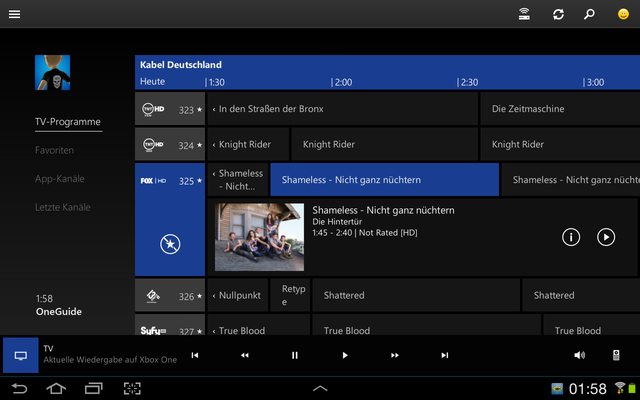
Und wer seinen TV-Receiver mit der Box verbunden hat, kann jetzt den One Guide auch auf dem Tab/Smartphone nutzen.
Inkl. "Programmzeitschrift" mit Infos zu den Sendungen, einfaches Umschalten durch Auswählen der jeweiligen Sendung....
Das ganze funktioniert sehr schnell.
So sieht es aus:
Auch eine neue Fernbedienung für TV und den Receiver ist dabei.
Auch damit funktioniert die Bedienung superschnell und flüssig. Ein Unterschied zur normalen Fernbedienung ist trotz Umweg über WLAN und
Xbox kaum auszumachen.
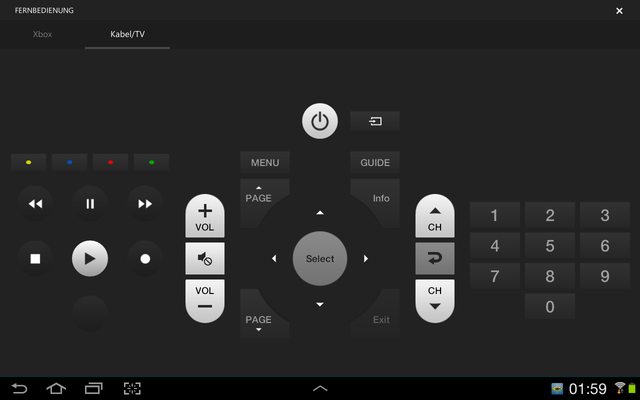
Alles in Allem läuft die Smartglass Beta sehr rund!
Bekommen kann man sie hier:
Windows 8-Geräte
Windows Phone 8
Android-Geräte
Und das kann es:
- OneGuide support is now built into the Xbox One SmartGlass app!
- View what’s on TV without interrupting what you’re doing on your Xbox One
- Change TV channels on your Xbox One through OneGuide on SmartGlass
- Find and favorite TV Channels
- TV Universal Remote Control to control your Cable Box and TV
- Improved text input awareness – The keyboard in SmartGlass now displays any time the onscreen keyboard is displayed on the Xbox One console, to make text input easier.
- Compare achievements – Compare your achievements for a game against what your friend has completed (This feature is currently available only on the Windows Phone 8 and Android versions of the SmartGlass update preview, for now.)
- Reorder your pins – Go to the Pins Hub in SmartGlass to drag and drop the order of your pins on the Xbox One console (This feature is currently available only on the Android version of the SmartGlass update preview, for now.)
- Updated game clip view count – SmartGlass now properly increments the view count of your Game Clips that you watched (This feature is currently available only on the Android version of the SmartGlass update preview, for now.)
- A few buttons in theCable/TV remote may not work.
- Syncing of your favorite TV listings on Android versions of SmartGlass and your console may not work consistently.
- Syncing of recent channels on Android versions of SmartGlass with your console may not work consistently – restarting the SmartGlass app should fix this issue.
- Some text in the preview version of SmartGlass is out-of-date or missing.
- You may encounter a blank screen when exiting the Android SmartGlass Cable/TV remote.
- In non-English locales, there may be some issues with the OneGuide feature showing some text that hasn't been fully translated, yet.
- Test out the OneGuide feature on your SmartGlass device
- Tune to a show from OneGuide in SmartGlass.
- Get rich details on your favorite shows.
- Favorite a TV channel and see it show up in the Favorites on your device.
- Use the Cable/TV remote feature to navigate through your cable box UI.
- Change your HD/SD settings in the SmartGlass settings
- Navigate to recent channels and tap once to change to that channel.
- Compare your achievements you’ve completed in comparison with a friend.
- Re-order the pins on your dashboard using SmartGlass.
Thank you for taking the time to preview the SmartGlass update! We’re looking forward to your feedback on what you like, what you don’t like, and any issues you might encounter during your preview. Here are a few tips on how to provide feedback that will help us investigate any issues you might encounter:
- Clearly and succinctly state what issue you are running into
- A good rule of thumb is to try and sum it up in 1-3 sentences.
- Simple Reproduction Steps
- Try to give the minimum steps necessary to reproduce your issue.
- Relevant platform/OS/client information
- Are you on Surface RT, Samsung Galaxy S4, Nokia 520, etc.
- What version OS are you running, e.g. Windows 8.1, Android 4.2.2?
- What version of the client are you running? (You can find it in the settings screen)
- What happens in the current released build
- Helps us understand if it’s a recent break or not.
Über den Smiley-Button (siehe erstes Bild, oben rechts) kann man direkt Feedback über die App abgeben.