Ist eigentlich schon mal jemandem aufgefallen, dass man seinen
Avatar jetzt auch auf der One umgestalten kann?
Ich hab das jedenfalls heute erst entdeckt.

Im Zuge des Preview-Programms gibt es übrigens
auch eine Beta für Smartglass.
Hat sehr interessante Funktionen!
Wer z.B. schon immer mal seine Pins im Dashboard auf einfache Art und Weise neu anordnen wollte, kann das jetzt via Smartglass auf dem
Touchscreen ganz einfach machen.
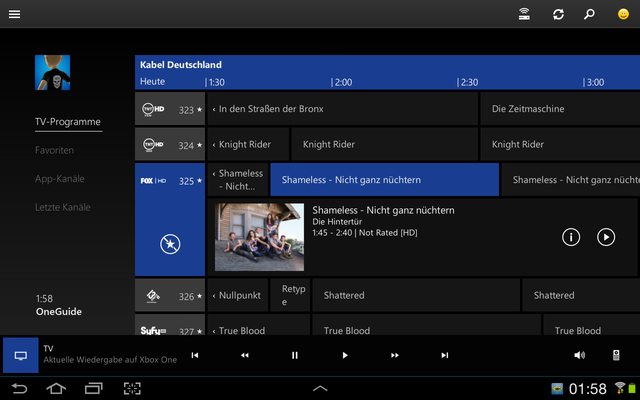
Und wer seinen TV-Receiver mit der Box verbunden hat, kann jetzt den One Guide auch auf dem Tab/Smartphone nutzen.
Inkl. "Programmzeitschrift" mit Infos zu den Sendungen, einfaches Umschalten durch Auswählen der jeweiligen Sendung....
Das ganze funktioniert sehr schnell.
So sieht es aus:
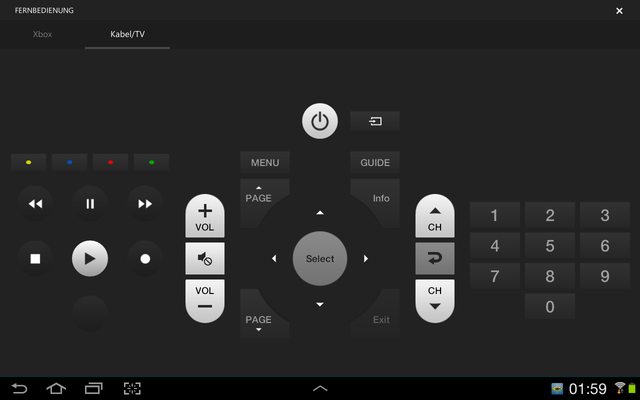
Auch eine neue Fernbedienung für TV und den Receiver ist dabei.
Auch damit funktioniert die Bedienung superschnell und flüssig. Ein Unterschied zur normalen Fernbedienung ist trotz Umweg über WLAN und
Xbox kaum auszumachen.
Alles in Allem läuft die Smartglass Beta sehr rund!
Bekommen kann man sie hier:
Windows 8-Geräte
Windows Phone 8
Android-Geräte
Und das kann es
:
- OneGuide support is now built into the Xbox One SmartGlass app!
- View what’s on TV without interrupting what you’re doing on your Xbox One
- Change TV channels on your Xbox One through OneGuide on SmartGlass
- Find and favorite TV Channels
- TV Universal Remote Control to control your Cable Box and TV
- Improved text input awareness – The keyboard in SmartGlass now displays any time the onscreen keyboard is displayed on the Xbox One console, to make text input easier.
- Compare achievements – Compare your achievements for a game against what your friend has completed (This feature is currently available only on the Windows Phone 8 and Android versions of the SmartGlass update preview, for now.)
- Reorder your pins – Go to the Pins Hub in SmartGlass to drag and drop the order of your pins on the Xbox One console (This feature is currently available only on the Android version of the SmartGlass update preview, for now.)
- Updated game clip view count – SmartGlass now properly increments the view count of your Game Clips that you watched (This feature is currently available only on the Android version of the SmartGlass update preview, for now.)
Known issues
- A few buttons in theCable/TV remote may not work.
- Syncing of your favorite TV listings on Android versions of SmartGlass and your console may not work consistently.
- Syncing of recent channels on Android versions of SmartGlass with your console may not work consistently – restarting the SmartGlass app should fix this issue.
- Some text in the preview version of SmartGlass is out-of-date or missing.
- You may encounter a blank screen when exiting the Android SmartGlass Cable/TV remote.
- In non-English locales, there may be some issues with the OneGuide feature showing some text that hasn't been fully translated, yet.
Activities we’d like you to try
- Test out the OneGuide feature on your SmartGlass device
- Tune to a show from OneGuide in SmartGlass.
- Get rich details on your favorite shows.
- Favorite a TV channel and see it show up in the Favorites on your device.
- Use the Cable/TV remote feature to navigate through your cable box UI.
- Change your HD/SD settings in the SmartGlass settings
- Navigate to recent channels and tap once to change to that channel.
- Compare your achievements you’ve completed in comparison with a friend.
- Re-order the pins on your dashboard using SmartGlass.
Tips on how to help us investigate reported issues
Thank you for taking the time to preview the SmartGlass update! We’re looking forward to your feedback on what you like, what you don’t like, and any issues you might encounter during your preview. Here are a few tips on how to provide feedback that will help us investigate any issues you might encounter:
- Clearly and succinctly state what issue you are running into
- A good rule of thumb is to try and sum it up in 1-3 sentences.
- Simple Reproduction Steps
- Try to give the minimum steps necessary to reproduce your issue.
- Relevant platform/OS/client information
- Are you on Surface RT, Samsung Galaxy S4, Nokia 520, etc.
- What version OS are you running, e.g. Windows 8.1, Android 4.2.2?
- What version of the client are you running? (You can find it in the settings screen)
- What happens in the current released build
- Helps us understand if it’s a recent break or not.
Über den Smiley-Button (siehe erstes Bild, oben rechts) kann man direkt Feedback über die App abgeben.